
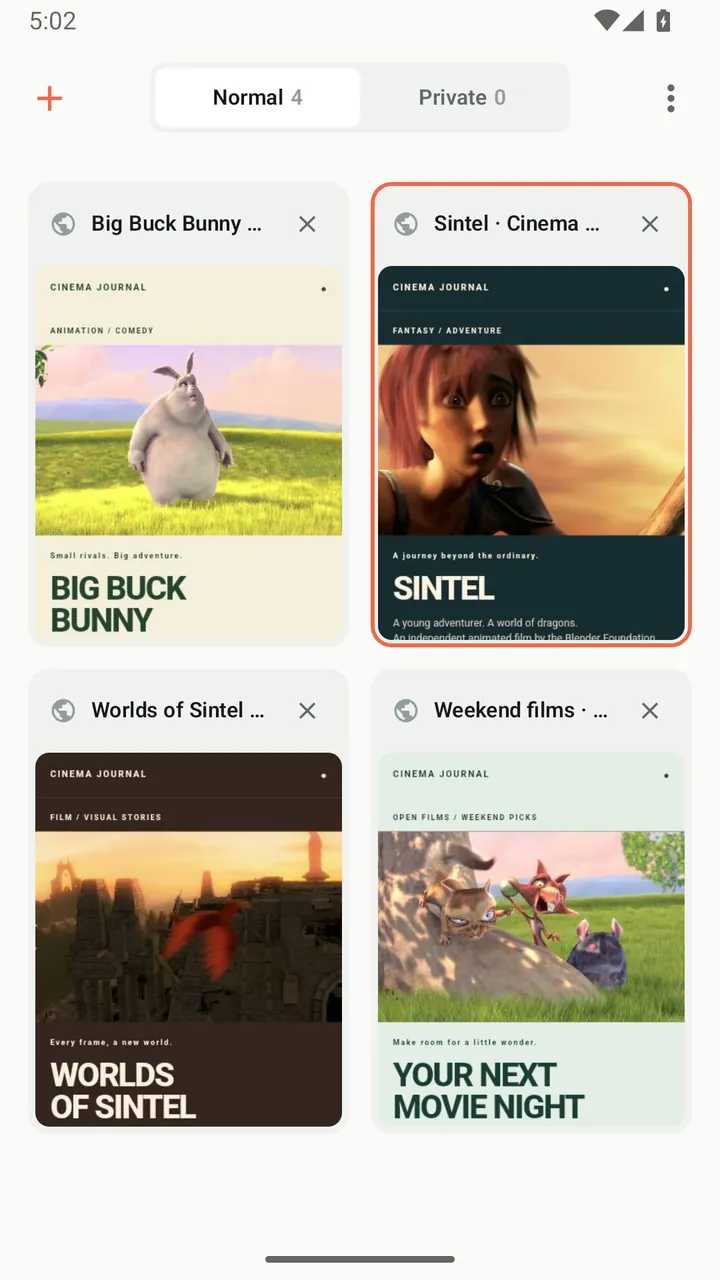
Tab grid
See all open tabs as previews in a two-column grid, with separate sections for normal and private tabs. Closed a tab by mistake? Undo it within a few seconds.
Private tabs
Private tabs do not write history, are not saved when you close the app and keep their previews in memory only.
Bookmarks and history
Organize bookmarks in folders and find recent pages in history, grouped by date and kept for 30 days.
Dark mode for the web
Turn web pages dark along with the app, using the browser's built-in dark rendering where available.
Desktop mode and zoom
Request the desktop version of a site and zoom into pages that normally block pinch-to-zoom.
Search your way
Choose from nine search engines, get suggestions as you type and pin up to nine shortcuts to the start page.
How it works
- Type a web address or a search in the address bar.
- Open links in new tabs or in a private tab.
- Save pages as bookmarks or as shortcuts on the start page.
Good to know
- Private tabs keep browsing out of your device's history. They do not hide your activity from websites or your network.
- Search suggestions come from the search engine you choose, which receives what you type in the address bar.
- Some sites may look different in dark mode or desktop mode.
Questions and answers
Can I make Lynvio my default browser?
Yes. Open Settings in Lynvio, choose to set it as the default browser and confirm Lynvio in the Android dialog.
Is private browsing in Lynvio anonymous?
No. Private tabs are not saved on your device, but websites, your internet provider and your network can still see your activity. Lynvio is not a VPN.
Which search engines can I use?
Lynvio offers nine search engines: Google, Bing, DuckDuckGo, Brave Search, Startpage, Yandex, Baidu, Sogou and 360 Search. The default depends on your region.
More features
Video downloader
Play a video, tap the media button and save it, with quality choice, resume and automatic link refresh.
Ad blocker
Block ads, trackers and pop-ups, then fine-tune any site from the shield in the address bar.
Player & library
A built-in player with speed control, gestures, subtitles, picture-in-picture and background audio.
Private Space
Move downloads into a PIN-protected space that locks the moment you leave the app.
Get Lynvio for Android
Free to download. Requires Android 7.0 or later.