
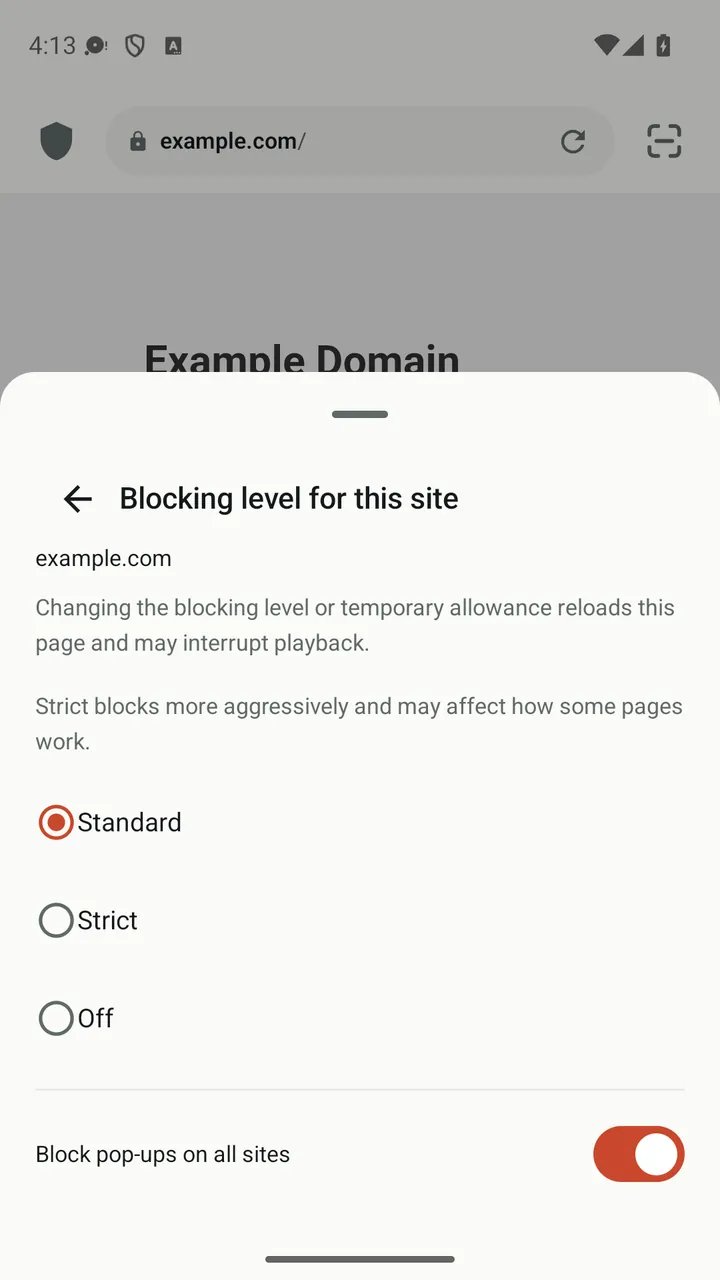
A shield in the address bar
A small badge shows how many items were blocked on the current page. Tap it to open the site panel.
Three levels per site
Standard is the balanced default. Strict adds lists for annoyances and cookie notices. Off turns blocking off for that site only.
Allow once
Need a page to work right now? Allow it for the current session without adding it to your allow list.
Help when a page breaks
If blocking seems to break a page, Lynvio offers to fix it, at most once per site per day.
Pop-up blocking
Unwanted pop-ups and new windows are blocked, with a separate switch for sites that genuinely need them.
Regional filter lists
Filter lists for your region are enabled automatically and update in the background every few days.
How it works
- Browse as usual. Blocking is on by default.
- Tap the shield to see what was blocked on the page.
- Choose Standard, Strict or Off for the site, or allow it once.
Good to know
- Blocking can occasionally change how a page looks or works. Lower the level for that site if it does.
- Filter lists are downloaded from their publishers, such as EasyList, and update automatically.
- No ad blocker catches everything, and results vary from site to site.
Questions and answers
Can I turn off ad blocking for one website?
Yes. Tap the shield in the address bar and choose Off. The setting applies to that website only. You can also allow a site just for the current session.
What is the difference between Standard and Strict?
Standard uses EasyList, EasyPrivacy, regional lists and pop-up blocking. Strict adds lists for annoyances and cookie notices and blocks more aggressively, which can affect some pages.
Does ad blocking slow pages down?
Filters run on your device from a precompiled rule set, so checking requests adds little overhead. Skipping ads and trackers can also mean less to download.
More features
Video downloader
Play a video, tap the media button and save it, with quality choice, resume and automatic link refresh.
Player & library
A built-in player with speed control, gestures, subtitles, picture-in-picture and background audio.
Private Space
Move downloads into a PIN-protected space that locks the moment you leave the app.
Browser
Tabs with previews, private tabs, bookmark folders, dark mode for web pages and nine search engines.
Get Lynvio for Android
Free to download. Requires Android 7.0 or later.